Parent and child having breakfast with custody calendar app on phone
Trusted by co-parents everywhere

Your kids deserve to know where they'll be.

The calm, private custody calendar that tracks days, logs exchanges, and keeps score — without needing your ex to sign up.

SplitDay is a co-parenting custody calendar app by Funtika LTD for iOS 15.6+ and Android 7+, localised in 65 languages. It works offline, stores your data on your device by default, and works on its own if the other parent never joins. Free with banner ads; Pro is $8.99/month, $44.99/year or $99.99 once — one subscription per household, not per parent.

SplitDay at a glance

Privacy-First

Your custody data stays on your device

Works Offline

No internet needed, ever

No Ex Required

Works without the other parent

Free to Start

Core features, no credit card

Everything co-parents need

From daily tracking to timestamped CSV and PDF exports — SplitDay handles it all.
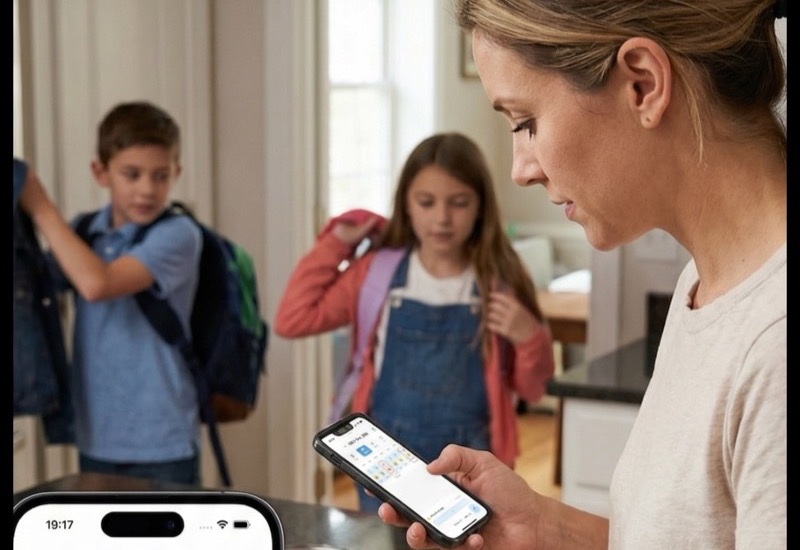
Mom checking custody calendar while kids get ready for school
Core Feature

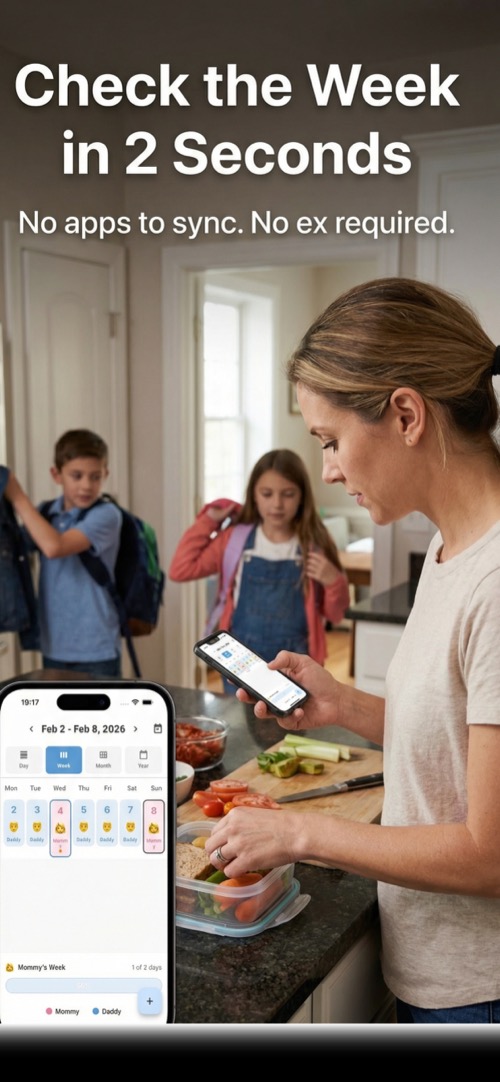
Check the week in 2 seconds

See your full custody schedule at a glance. Day, week, 2-week, month, and year views — all color-coded by parent. No apps to sync. No ex required.

Parent viewing custody scoreboard on phone
End the Arguments

The app keeps score. You keep your sanity.

Real-time balance of custody days between parents. Know exactly who owes what — in days or hours. Export the full history as a CSV when your lawyer asks.
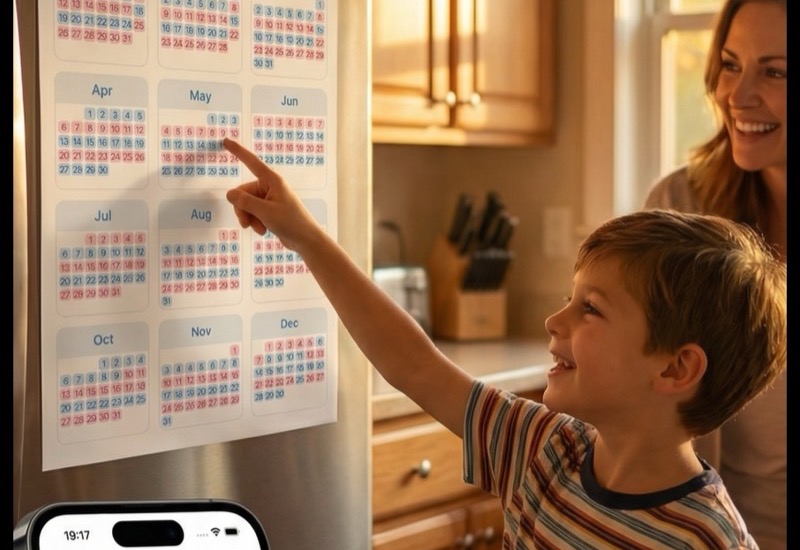
Child pointing at printed custody calendar on fridge
Pro Feature

Kids know where they'll be

Print beautiful monthly calendars your kids can hang on the fridge. Big text, parent colors, motivational quotes. No more “Where am I today?”

Exchange Logging

Log every swap, borrow, return, gift, and phone call. Build a complete, timestamped history.

Budget & Expenses

Track shared child expenses, scan receipts with AI, and split costs fairly between parents.

Household Sharing

Pro

Invite your co-parent or caregivers to view and edit the custody calendar together.

Up and running in 5 minutes

1

Set your custody pattern

Choose alternating weeks, weekends, split week, or create your own custom schedule — or skip the pattern entirely and log days as they happen.

2

Track days & log exchanges

Mark who has the kids each day. Log swaps, borrows, and returns with one tap.

3

Export, print & share

Print kid-friendly calendars, export timestamped reports, or share with your co-parent.

Try it now — mark your custody days

Tap any day to assign it to a parent. See how easy custody tracking can be.

Sun Mon Tue Wed Thu Fri Sat
Mom: 0 days | Dad: 0 days

Like it? Get the full experience in the app — with sharing, exports, and more.

Continue in SplitDay

Split expenses fairly

Track who paid what and see who owes — no spreadsheets needed.

Mom 50% Split Ratio Dad 50%
Total $0.00
Mom: $0.00 Dad: $0.00

All settled!

Track real expenses in the app — with receipt scanning, categories, and export.

Try Budget in SplitDay

How SplitDay compares

Competitor prices read off each vendor's own published pricing page on . OurFamilyWizard bills per parent (a two-parent household pays twice); 2Houses bills per family; one SplitDay subscription covers your household. Full breakdown in our 2026 co-parenting app comparison.

Feature SplitDay OurFamilyWizard 2Houses Google Calendar
Annual cost Free / $44.99/yr From $110/parent/yr $99/yr Free
Requires both parents No Yes Yes No
Custody scoreboard
Kid-friendly calendars
Works offline
Budget tracking Limited
Timestamped CSV and PDF exports Limited

Trusted by co-parents everywhere

"

Finally, an app that doesn't require my ex to sign up. I can track everything on my own terms.

Sarah M.

Mom of 2, alternating weeks

"

The printable calendar changed everything. My kids stick it on the fridge and they always know where they'll be.

David K.

Dad of 3, split week schedule

"

I used to argue about custody days constantly. Now we just check the scoreboard. Simple.

Michelle R.

Mom of 1, alternating weekends

Frequently Asked Questions

Everything you need to know about SplitDay.

No. SplitDay works without your ex. You can track custody days, log exchanges, and keep score entirely on your own. If you want, you can invite your co-parent later — but it's completely optional.

Yes. The custody calendar, scoreboard and exchange logging are completely free, and so are the budget basics — 3 expenses and 3 AI receipt scans a month. The free plan is ad-supported. Pro removes the ads and those limits and adds kid-friendly printable calendars, household sharing and in-app messaging, from $8.99/month, $44.99/year or $99.99 for lifetime access.

No. You can start using SplitDay immediately without creating an account. Sign in with Google or Apple is optional and only needed for cloud backup, sharing, and Pro features.

Yes. SplitDay is available on the App Store for iPhone and iPad, and on Google Play for Android devices. Your data syncs across devices with a Pro subscription.

Under 5 minutes. Choose your custody pattern (alternating weeks, split week, etc.), name your parents, pick colors, and you're ready to go. No lengthy onboarding or account creation required.

SplitDay supports alternating weeks, alternating weekends, split week, 2-2-3 split, and fully custom schedules — or no fixed schedule at all: start with a blank calendar and log days as they happen, ideal for irregular visitation. You can also set a specific custody shift time (e.g., 6 PM on Fridays) and manage holidays separately.

Yes. SplitDay supports hourly exchanges. You can select specific hours within a day for split-day arrangements, and the scoreboard tracks both day and hour balances.

Yes. SplitDay has a dedicated holiday section with ready-made presets for 12 countries. In a couple of taps you can add public holidays and school breaks to your plan and assign each one to a parent — you decide which days change, nothing is rewritten for you.

Just tap the day and reassign it to the other parent. SplitDay logs every change with a timestamp, so you always have a record. You can also log swaps, borrows, and returns as exchange types.

The scoreboard tracks the real-time balance of custody days between parents — in both days and hours. It shows exactly who has had the kids more and by how much, eliminating arguments about fairness.

Yes. By providing an objective record of custody days and a real-time scoreboard, SplitDay removes the guesswork and emotion from 'who had the kids more' arguments. The built-in messaging tone meter also helps keep conversations civil.

You can log swaps, borrows, returns, gifts, phone calls, and hourly exchanges. Each exchange is timestamped and includes the date, type, parents involved, and optional notes — creating a complete custody history.

Yes. The History tab shows your complete exchange and custody log with dates, types, and running totals. You can review any past month and see exactly how custody days were distributed.

Yes. Pro users can create a shared household and invite their co-parent, family members, or caregivers. Everyone sees the same calendar, exchanges, and budget in real-time.

Yes. Pro households include a built-in messaging feature with a tone meter that helps keep conversations respectful and focused on the children.

Yes. You can add helpers like grandparents, nannies, or babysitters and assign them to specific days. Family members and friends can also be invited to view the shared calendar with read-only access.

No. Notes you add to exchanges are only visible to you unless you choose to share your household. Even in shared households, each parent controls what they share. Your personal data stays private.

Yes. The built-in budget tracker lets you log child-related expenses, scan receipts with AI, and see a running balance of who owes what. You can split costs 50/50 or use a custom ratio.

Yes. SplitDay uses AI-powered receipt scanning. Just take a photo of a receipt and the app automatically extracts the amount, date, and description — saving you time on expense tracking.

Yes. Pro users can print beautiful kid-friendly monthly calendars with big text, parent colors, and emojis that children can hang on the fridge. You can also export your full custody history as a timestamped CSV file, and expense reports as PDFs with Pro, to share with your lawyer or mediator.

You can export timestamped records — your full custody history as a CSV, and expense reports as PDFs with Pro — to share with your lawyer or mediator. SplitDay can't promise that any court will accept an export, so ask your attorney what your jurisdiction requires.

SplitDay is not a legal tool, and we can't promise that any court will accept an export. What you do get is timestamped PDF and CSV exports documenting custody exchanges, day assignments, and schedule changes — records you can share with your lawyer or mediator. Always consult your attorney for legal advice.

Yes. Your custody data is stored locally on your device by default, and it is never sold. Cloud sync is optional and uses encrypted connections.

Yes. All your data is stored locally on your device. SplitDay works fully without an internet connection. Cloud backup and sync across devices are available for Pro users.

If you're signed in with Google or Apple and have a Pro subscription, your data is backed up to the cloud. Simply sign in on your new device and your calendar, exchanges, and budget will sync automatically. Without cloud backup, data is stored locally on the device.

Yes. SplitDay offers a home screen widget for both iOS and Android that shows today's custody status and the upcoming week at a glance — no need to open the app.

SplitDay uses your device's local time zone for all dates and exchanges. If parents live in different time zones, each sees the calendar in their own local time. The custody shift time setting lets you define exactly when custody changes happen.

Yes. You can start using SplitDay immediately — just set your custody pattern and start tracking. There's no data import needed since SplitDay builds your history as you go. Most users are set up in under 5 minutes.

Pro includes kid-friendly printable calendars, household sharing with your co-parent, in-app messaging with tone meter, cloud backup and sync, ad-free experience, and activity logging. Available as monthly ($8.99), annual ($44.99), or lifetime ($99.99).

SplitDay currently tracks one custody schedule per household. For children with identical schedules (most common), one setup covers all. For different schedules, you can create a separate household for each arrangement.

Watercolor illustration of child walking between two happy homes

Two homes means twice the love.

— A reminder for every co-parenting family
Two phones showing custody calendar with child drawing between them

Your kids deserve calm.

Start tracking custody today — it's free.